Your products are great! but I should not be seeing retail pricing.
A wholesale customer once said that to me, and honestly, it summed up the entire issue in one line.
If you run a B2B or wholesale WooCommerce store, pricing is never just a number. It shapes how buyers see your professionalism. Show the wrong price and you create friction. Create friction and you slowly lose trust.
WooCommerce, by default, treats every customer the same. That works perfectly for retail. It does not work for wholesale.
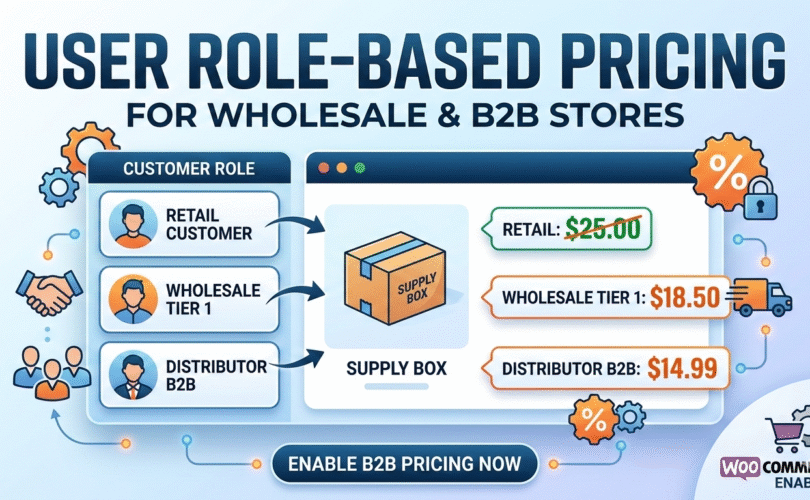
This is where Role based pricing WooCommerce becomes important. It allows your store to recognize who the customer is and display pricing accordingly. No coupons to remember. No manual order edits. No uncomfortable refund conversations afterward.
Let’s look at how to handle this the right way.
Wholesale pricing is different from retail pricing
Retail stores are built on simplicity. One product, one visible price, same experience for everyone.
Wholesale is different.
You might be serving:
Small retailers ordering limited quantities
Large distributors placing bulk orders
Members who receive loyalty pricing
Staff accounts that need internal cost visibility
If all of them see the same price, your entire pricing structure starts to break down.
With WooCommerce custom pricing by user role, you create controlled segmentation. Each role sees the price that reflects your agreement with them. That separation keeps things clean and predictable.
And once that control is in place, everything else becomes easier.
Start with pricing logic, not random discounts
Before adjusting anything inside WooCommerce, sit down and define your pricing model clearly.
Ask yourself simple but important questions:
What margin do wholesale customers actually require
Do distributors deserve deeper pricing tiers
Should guests see pricing at all
Are certain products excluded from role discounts
When store owners skip this step, they end up stacking random percentage reductions without thinking long term.
Role based pricing WooCommerce works best when it reflects an intentional structure. It should support your business model, not undermine it.
Setting custom prices per product
Inside the product editor, you can assign unique prices for different user roles.
What many store owners forget is that not every product should follow the same discount pattern.
Imagine a product priced at 120 dollars for retail.
You might set:
Wholesale 95 dollars
Distributor 85 dollars
But another product may already operate on a tight margin. In that case, wholesale pricing might only drop to 105 dollars.
That flexibility is what makes WooCommerce custom pricing by user role powerful. You are not forced into one global rule. You can make decisions product by product.
That is how you protect profitability.
Variable products need extra care
Most wholesale stores sell variations. Pack sizes, configurations, materials, specifications. Each variation often has a different cost base.
This is where careless discounting can quietly damage margins.
For example, imagine you sell supplements:
30 tablets
90 tablets
300 tablets
The 300 tablet option likely already includes built in savings. Applying an additional flat wholesale discount without reviewing the numbers could eat into profits.
With properly structured Role based pricing WooCommerce, you can assign specific pricing to each variation for each role. That level of detail matters in wholesale operations.
Precision protects your business.
Percentage pricing can help, but use it wisely
For stores with large catalogs, percentage discounts feel convenient.
Instead of editing hundreds of products individually, you apply something like:
Wholesale 20 percent off
Distributor 35 percent off
It saves time. It reduces manual work.
But if your margins vary significantly across categories, blanket percentages can create hidden losses.
A smarter approach is to combine methods:
Use percentage pricing where margins are consistent
Use fixed role based pricing where margins are tight
That is when WooCommerce custom pricing by user role becomes strategic instead of automatic.
Controlling price visibility
Many serious B2B stores do not display pricing to the public.
Instead, visitors see a message such as:
Login to view wholesale pricing
This small decision does two things.
It prevents retail customers from seeing sensitive wholesale margins.
It encourages serious buyers to create an account.
With Role based pricing WooCommerce, you can hide prices or disable the Add to Cart button when no valid pricing is assigned. The result feels structured and intentional.
It gives your store a more professional presence.
Managing large catalogs without chaos
If your store has twenty products, manual editing is manageable.
If it has five hundred, it is not.
Bulk editing tools allow you to update pricing across multiple products at once. Import and export features make large scale changes practical, especially when supplier costs shift or seasonal adjustments are required.
At that point, pricing stops being a simple setting. It becomes part of your operational system.
Wholesale businesses grow. Your pricing structure should grow with them.
Presentation matters more than most people realize
Once users log in, pricing should be clear and easy to understand.
If customers hesitate because pricing looks confusing, order values drop.
Depending on your store layout, you may:
Show role specific prices directly on shop pages
Display structured pricing tables
Add short notices explaining eligibility
Clear communication builds confidence. And confident buyers place larger orders without second guessing.
Common mistakes store owners make
After working with many B2B WooCommerce setups, certain patterns appear repeatedly.
Some create too many overlapping roles.
Some combine coupons with role based pricing and create conflicts.
Some forget to configure variation level pricing.
Others assume the admin view matches what customers see.
Always test your store by logging in as different user roles. Walk through the full purchasing process from their perspective.
That simple habit prevents most pricing mistakes.
Frequently asked questions
Can I set different prices for each user role?
Yes. Each role can have its own regular and sale price per product.
Does this work with variable products?
Yes. Every variation can carry separate pricing based on role.
Can I hide prices from guests?
Yes. You can hide pricing completely or remove the Add to Cart option until login.
Is percentage pricing required?
No. You can use fixed pricing, percentage adjustments, or a combination of both.
Is this suitable for wholesale only stores?
Yes. In many cases, it is necessary.
Final thoughts
Wholesale pricing is about structure, segmentation, and margin awareness.
When you set up Role based pricing WooCommerce with intention, your store stops functioning like a basic retail shop and starts operating like a true B2B system. Different buyers see different prices, and that separation happens smoothly in the background.
Using WooCommerce custom pricing by user role thoughtfully allows you to maintain fairness for buyers while protecting your profit margins.
That balance is what keeps a wholesale business stable and sustainable over time.